
Buy an international number
Search, purchase and connect a Telnyx number in another country directly from Phone Clover settings.
For admins · Updated Sep 23, 2026
All guides
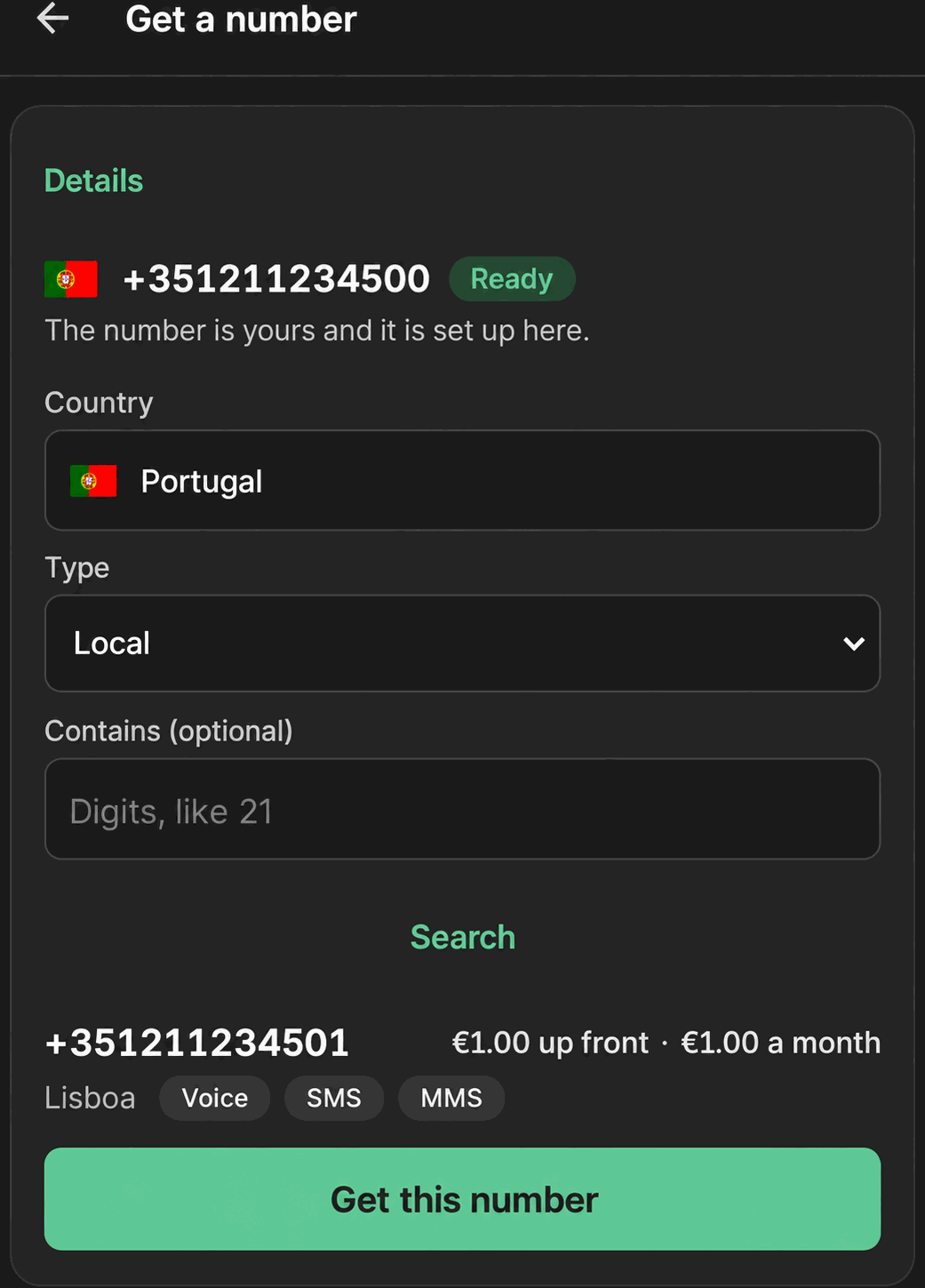
If you need a phone number in a country other than the US, you can search for and buy one without leaving HighLevel. This page covers the international numbers shop inside Phone Clover’s Numbers settings.
Before you start
- Who can do this: an admin of the HighLevel sub-account.
- What you need: a positive balance on your Telnyx account. Purchases are billed directly to Telnyx.
Step by step
- Open the shop. Go to Settings → Numbers → Add a number, then choose Get a number.
- Search. Pick a Country from the typeahead, and a Type: Local, Mobile, Toll-free, National, or Shared cost. Optionally filter by digits you want the number to contain.
- Review results. Each result shows a price, for example “$1.00 up front · $1.00 a month,” and capability chips for Voice, SMS, MMS, Fax and 911, so you can see at a glance what the number actually supports before buying.
- Complete any required paperwork. Some countries require extra information before a purchase can go through: documents, an address on file, or additional fields. The wizard asks for exactly what that country needs before letting you continue.
- Confirm the purchase. Phone Clover asks: “Buy
<number>? Telnyx charges<total>to your account.” Confirm to complete the purchase.
Once purchased, the number appears in your Numbers card in Settings, the same as any other connected number, with the same label, capability chips, Default and Enabled controls. See Set up your first number for how those controls work.
Note: capability chips vary a lot by country and number type. A 911 chip, for example, will not show on numbers where emergency calling is not offered at all by the carrier for that country. Do not assume every capability is available everywhere.
Limits
- Up to 5 purchases per day, per sub-account. This is a rate limit to prevent runaway spending, not a plan restriction; it resets daily.
- Purchase requires a sufficient Telnyx account balance. If a purchase is blocked for balance reasons, add funds in your Telnyx account and try again.
- Some countries’ numbers are not formatted as neatly as US numbers in the numbers list yet; the number itself still works correctly even if the display formatting looks slightly off.
- Alphanumeric sender ID, number porting into your account, and short codes are not available as self-serve purchases yet. The wizard offers a mailto link to request these directly instead of a purchase flow.
Texting compliance varies by country
US numbers need A2P 10DLC registration for reliable business texting; see Register for A2P 10DLC. Other countries have their own carrier and regulatory requirements that are not covered by that same registration. If you plan to text at volume from an international number, check with support about what that specific country requires before relying on it for automated or bulk sends.
Troubleshooting
The country I need isn’t in the search list. Telnyx’s own inventory varies by country and number type; not every country has every type available at all times. Try a different type for the same country, or check with support about current availability.
The purchase confirmation didn’t go through. This is most often a balance issue. Check your Telnyx account balance and try again; if the balance looks sufficient and the purchase still fails, contact support.
A number I bought shows the wrong capability chip. This is a known display issue on some numbers and does not affect whether the number actually works for calling or texting. Contact support if you are unsure what a specific number truly supports before relying on it.
I need to port an existing international number into my account, not buy a new one. Porting is not self-serve yet. Use the mailto link offered in the wizard to request it directly.