
What the settings health badges mean
Read the Phone health badges and Needs attention card on the Overview tab, and know what to fix for each one.
For admins · Updated Sep 23, 2026
All guides
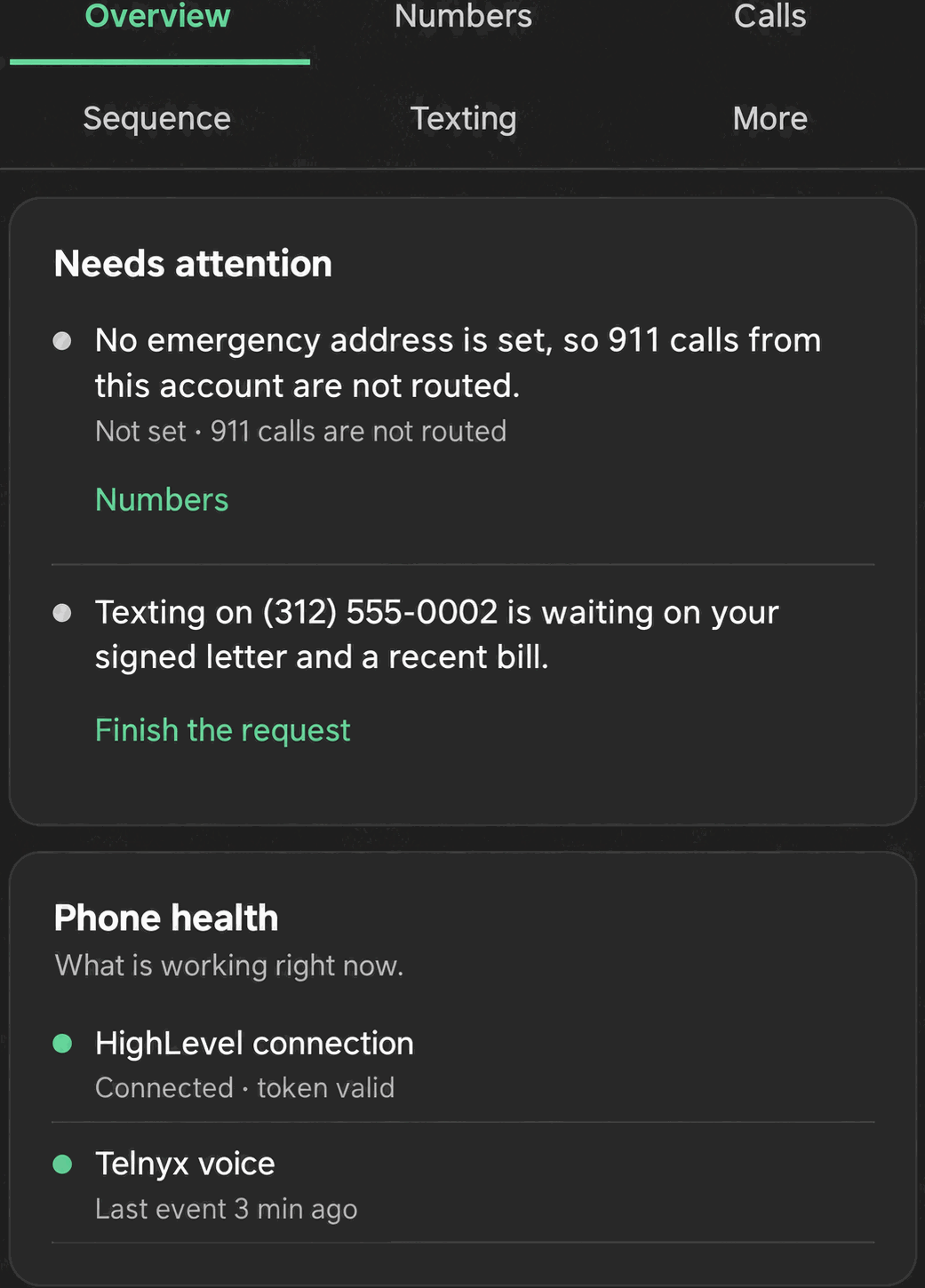
The Overview tab in Settings is the first place to check when something feels off with calling or texting. It surfaces two cards built specifically to flag problems: Needs attention and Phone health. This page explains what each badge and card row means.
Needs attention
This card only appears when something is actually wrong. If everything is fine, it does not show at all. When it does appear, each row links straight to the tab where you fix it. Rows can include:
- HighLevel not connected
- Texting not registered
- No emergency address on file
- A number at risk with the carriers, or paused
- A number of texts blocked in the last few days
- Hosted SMS or international number orders waiting on documents
- Failed orders or registrations
Work through the rows from top to bottom. Fixing the underlying issue (for example, finishing an A2P 10DLC registration) clears the row automatically the next time the page checks.
Phone health
This card shows five badge rows, checked continuously:
| Badge | What it checks | If it shows a problem |
|---|---|---|
| HighLevel connection | Whether Phone Clover’s connection to your HighLevel account is still valid | Reinstall from the Marketplace listing. See Install Phone Clover from the HighLevel Marketplace. |
| Telnyx voice | Whether calls are routing correctly through Telnyx | Contact support with your account and number details. |
| Telnyx messaging | Whether texts are routing correctly through Telnyx | Check Why texts fail and what the reasons mean first. |
| Texting registration | Whether your business is registered for US texting (A2P 10DLC) | Finish or start registration. See Register for A2P 10DLC. |
| Emergency address | Whether a 911 emergency address is on file for your numbers | See the note below. This is expected to show a problem today. |
Warning: emergency (911) addresses are not set up on any number yet. The Emergency address badge will show a problem for every account until this ships. It is not something you can currently resolve from Settings, and Phone Clover numbers should not be relied on for 911 calling.
Numbers at a glance
Still on the Overview tab, this card gives a quick read on your numbers without opening the Numbers tab: which number is your default, how many of your connected numbers are turned on out of the total you have, and a texting status chip per account (Registered, In review, or Not registered). Use this as a fast check before digging into Settings → Numbers.
Missed calls summary
A short summary of your forward-to number and voicemail state, each with a Change link straight to the relevant setting in Settings → Calls.
Reading it together
A useful order to check these when something is broken:
- Look at Needs attention first. If a row is there, that is almost always the actual cause.
- If nothing is flagged there but something still feels wrong, check each Phone health badge in order.
- Use Numbers at a glance to confirm the right number is set as default and turned on.
Troubleshooting
A badge is red but everything seems to work fine. Trust the badge over your own impression for texting-related rows in particular; carrier-side problems (like a number getting flagged) can cause some texts to fail silently without an obvious symptom on your end. Check Why texts fail and what the reasons mean to see if any messages were actually affected.
The HighLevel connection badge keeps showing a problem after reinstalling. Make sure you reinstalled into the same sub-account, and that the admin doing the reinstall is the same account or has the same install permissions as before. Contact support if the badge does not clear within a few minutes of a successful reinstall.
Everything shows healthy but a specific number still has issues. The Phone health card reports on your account overall, not per number. Open Settings → Texting → Number health for a per-number view. See Number health radar.