
SMS firewall: block and allow lists
Stop junk texts before they reach HighLevel Conversations, with allow lists, block lists, a country allowlist, and automatic filtering rules.
For admins · Updated Sep 23, 2026
All guides
Inbound texts pass through Phone Clover before HighLevel ever sees them. The SMS firewall filters junk out at that point, using lists you control plus a set of automatic rules. Because filtering happens before the message reaches Conversations, a blocked text never shows up as unread, never triggers a notification, and never clutters a rep’s inbox in the first place.
Where to find it
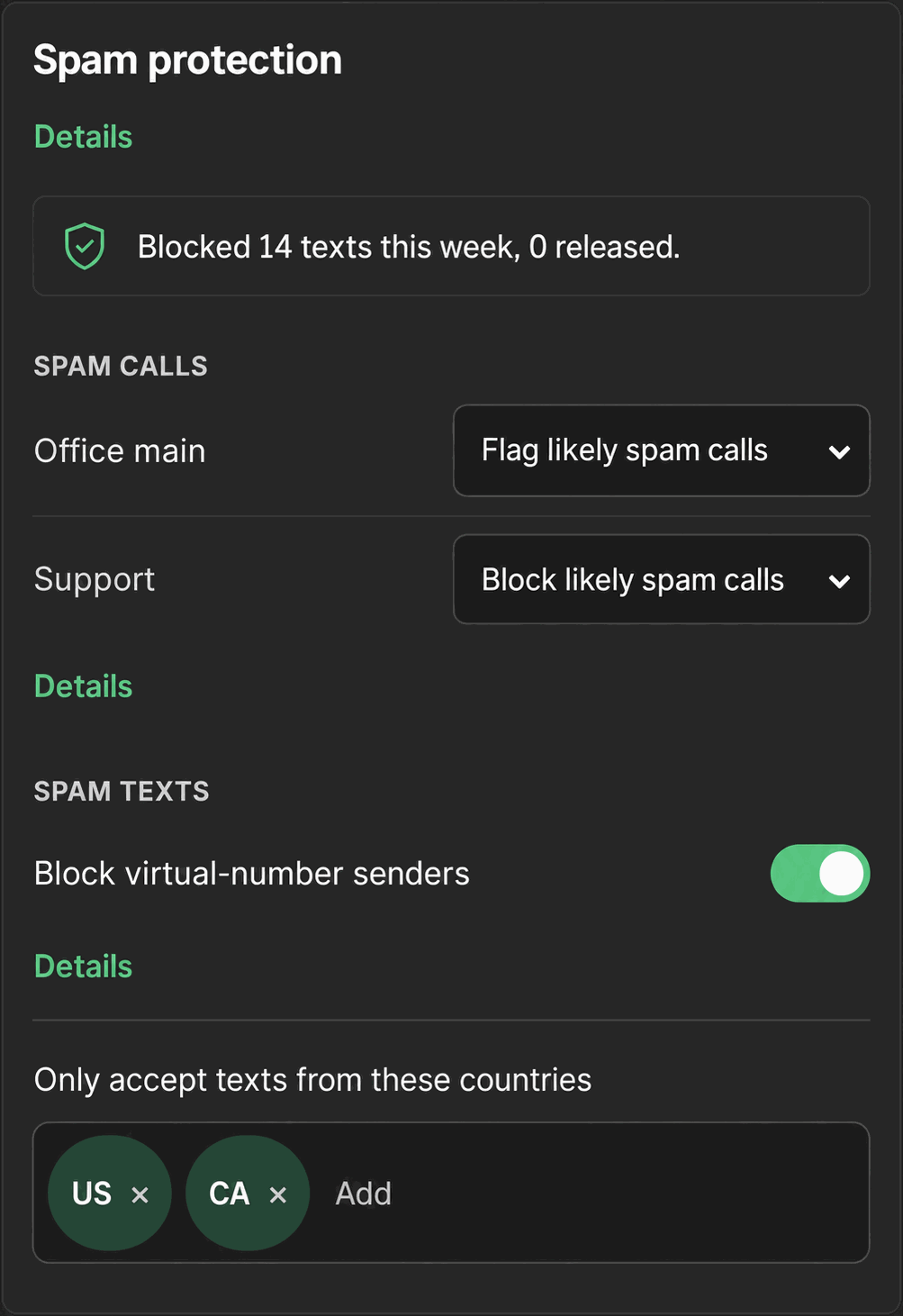
Settings, then the More tab, then Spam protection. Voice call screening (a separate per-number setting) shares this card; this page covers the texting side.
The controls
- Block virtual-number senders. A switch that blocks texts from VoIP or virtual numbers.
- Country allowlist. “Only accept texts from these countries,” using two-letter codes like US, CA, GB. Leave it empty to accept texts from anywhere.
- Quarantine list. “Blocked in the last 7 days.” Each entry shows the sender, the time, and a reason chip. Undecided entries get a Release or Always block action.
The automatic rules, in order
Phone Clover checks these in a fixed order for every inbound text:
- Allow list beats everything else. If the sender is allowed, the message goes through.
- Block list. If the sender is blocked, the message is quarantined.
- Country allowlist, if you set one.
- VoIP/virtual-number line-type block, if that switch is on.
- Content-score rule. A message scoring 70 or higher is quarantined.
- Velocity/rate rule, which catches a sender sending unusually fast.
Note: Quarantined message bodies are stored for up to 500 characters. The underlying number-type lookup (used for the VoIP block) is cached for 30 days, so a number’s type does not re-check on every message.
Managing the quarantine list
Each undecided entry in the last-7-days quarantine list has two actions:
- Release: let this specific message through and remove it from quarantine.
- Always block: add the sender to the block list so future texts from it are quarantined automatically.
Related to voice
The same Spam protection card also has a Call screening control, set per number: Let all calls through, Flag likely spam calls, or Block likely spam calls. Voice screening uses only the manual allow/block lists, not the automatic content, velocity, country, or VoIP rules described above.
Troubleshooting
A legitimate customer’s text got quarantined. Find them in the quarantine list and click Release. If it keeps happening for the same number, check whether your country allowlist or the VoIP block is catching a number type you didn’t intend to filter.
Texts from a sender keep arriving despite blocking them. Confirm the sender is on the block list and not also on the allow list, since allow always wins over block.
No texts are getting quarantined at all. That can be normal if nothing suspicious has come in. Check the country allowlist is not empty when you meant to restrict it, since an empty allowlist accepts texts from anywhere.
You’re not sure whether a missing text was blocked or just never sent. The firewall only ever touches inbound texts. If a text you sent never reached a customer, that is a delivery problem, not a firewall block. See SMS not sending for that case instead.