
The problem
Working a list of leads or follow-ups one at a time, by hand, means constantly switching between a spreadsheet or contact list and the dial pad, and re-checking do-not-call status yourself before every call. It’s slow, and it’s easy to accidentally call someone who opted out or is outside a reasonable calling window.
Calling lists automate the mechanical parts, building the list and dialing through it, while keeping a human rep in the loop for every actual conversation.
How it works in HighLevel
There are two ways to start a list. From the Phone page’s Lists tab, type a tag, for example new-lead, and press Start; Phone Clover looks up every contact carrying that tag through a GHL contacts search and begins dialing. Or, from GHL’s own Contacts grid, tick the rows you want and click “Call N selected” in the floating widget, the button label always reads the live count of contacts you’ve ticked.
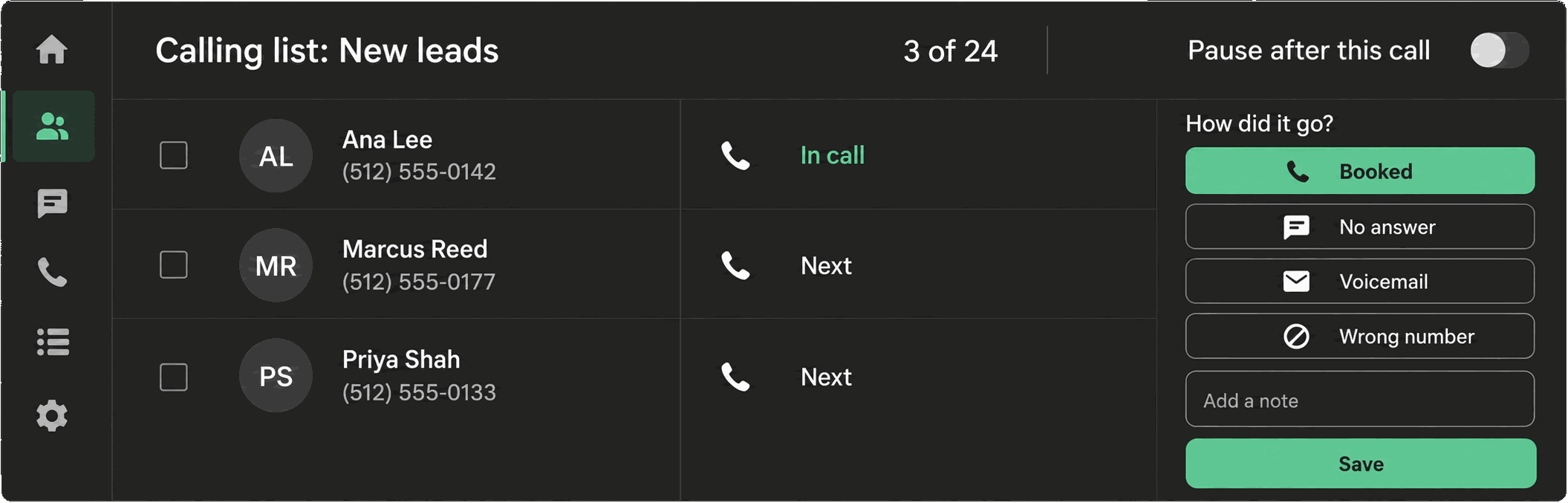
Either way, the list works through contacts one at a time. Before every single call, not just when the list was built, Phone Clover re-checks GHL’s DND flag, its own suppression table, whether the number is still callable, whether the contact is still in this sub-account, and US calling hours, so a contact who opts out or moves outside the calling window mid-list gets skipped safely instead of called anyway. A countdown runs between calls, and pause, resume and stop controls are visible the entire time. After every call, the post-call outcome card is required, not optional, before the list moves on.
Every option explained
| Setting | Where | What it does |
|---|---|---|
| Tag field | Lists tab | Starts a list of every contact with that GHL tag, up to the first 100 |
| “Call N selected” | Floating widget, after ticking contacts in GHL | Starts a list from contacts ticked in the Contacts grid, up to 100 IDs |
| Calling hours toggle | Settings → Sequence → “Calling hours: 8am–9pm” | Turning it off removes the time-of-day check; DND checks stay on regardless |
| Seconds between calls | Settings → Sequence | Sets the countdown between calls, 0–300 seconds, default 3 |
| Review outcome before next call | Settings → Sequence | Requires the rep to review the outcome card before the list advances |
| Automatic voicemail detection | Settings → Sequence | A separate, off-by-default toggle using Telnyx’s paid Premium AMD; not part of the basic list behavior |
Note: Lists deliberately do not include predictive dialing or answering-machine detection by default. That’s a design choice, not a gap, so every call a rep sees is one they’re actually expected to talk to.
What runs on Telnyx
Each call in a list places over the same Telnyx voice path used everywhere else in Phone Clover, one call at a time, from the number configured for the sub-account. If automatic voicemail detection is switched on in Settings → Sequence, that specific feature uses Telnyx’s paid Premium AMD to distinguish a live answer from an answering machine, and Telnyx usage charges apply for that add-on. Outside of that toggle, Telnyx’s role is placing and connecting each call in sequence, nothing more.
Who uses it
Reps run lists to work through outreach without switching between a spreadsheet and a dial pad, whether that’s fresh leads tagged by a workflow or a batch of contacts they’ve ticked by hand. Admins use the tag-based version from the dashboard’s “Call a tag” card the same way a rep would from the Lists tab, and they’re the ones who configure calling hours and the pace between calls in Settings.
What to expect
Lists cap out at 100 contacts per run, whether from a tag or a selection, so a larger campaign needs to be split into batches. This is a manual-pace dialer on purpose: no predictive dialing, and no answering-machine detection unless the separate, paid Premium AMD toggle is turned on for the sequential dialer specifically. And because every call in a list requires an outcome before moving on, a rep who skips reviewing the outcome card will find the list waiting on them rather than advancing automatically.