
The problem
A manager who can’t see call volume, missed calls or rep activity is managing blind. Pulling that picture together by hand from call logs or a separate reporting tool takes time a busy team doesn’t have, and by the time a report is built, the numbers are already stale.
This gets worse the moment a team grows past one or two reps. Without a shared view, a manager has no fast way to answer basic questions, who’s actually answering calls today, which reps are missing the most, whether a specific missed caller has been followed up on, without pinging each rep individually or digging through GHL’s own activity feed by hand.
Phone Clover’s dashboard puts that reporting next to the phone itself, refreshing automatically, so it’s current without anyone having to run a report.
How it works in HighLevel
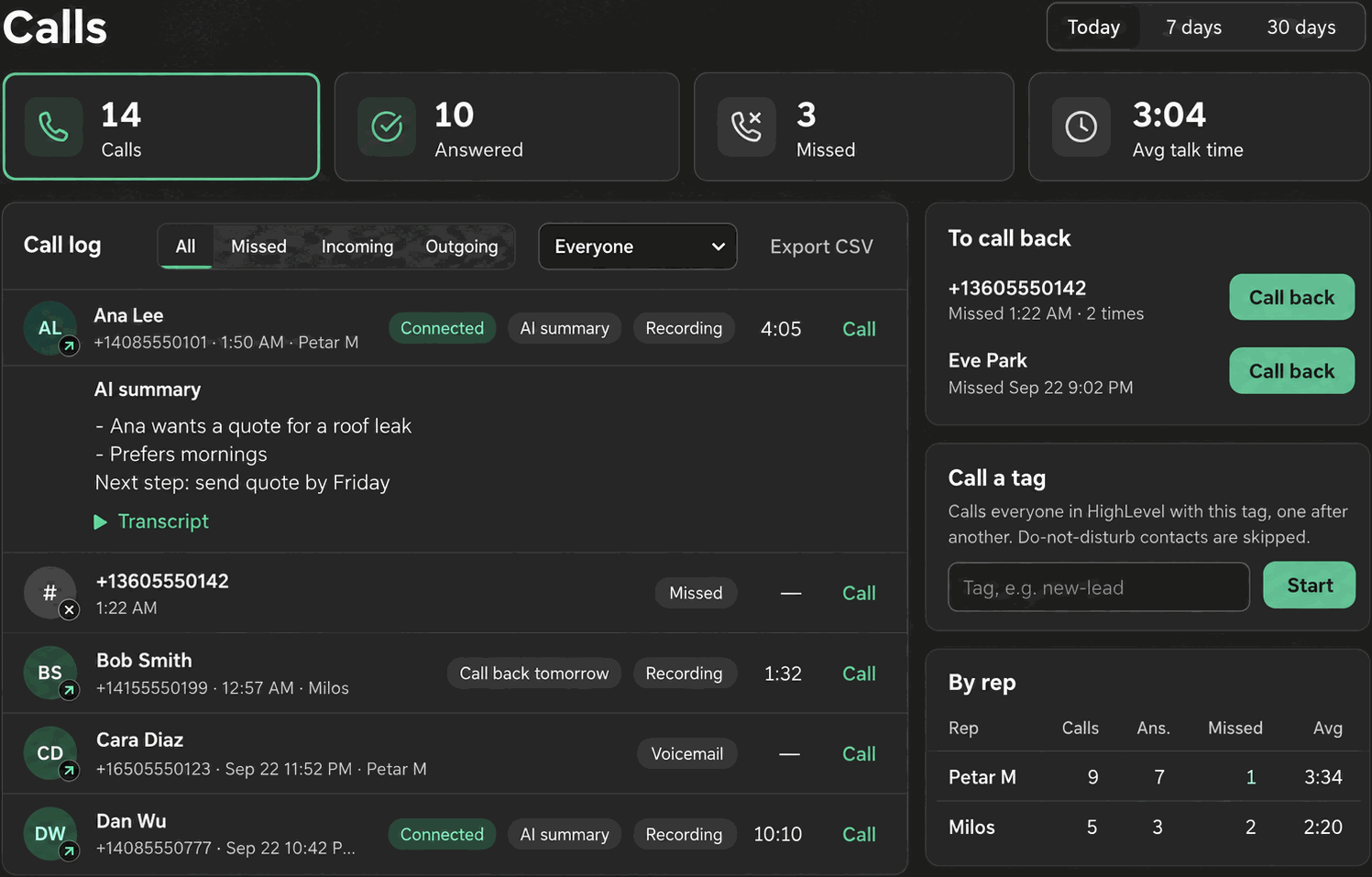
The dashboard, titled “Calls,” appears alongside the phone in a two-column layout, but only on the un-embedded Phone page at a window width of 1000px or more; on a narrower or embedded view, reps see the phone’s tab bar instead. Three periods are available, Today, 7 days and 30 days, with the server supporting a lookback up to 90 days even though the picker tops out at 30. Four stat tiles sit at the top: Calls, Answered, Missed and Avg talk time; clicking Calls or Missed filters the log below to match.
Below the tiles, the call log itself can be filtered to All, Missed, Incoming or Outgoing, and an admin also sees a rep filter, defaulting to “Everyone,” once there are two or more reps at the sub-account. Clicking a row expands it to a recording player, and if the AI notes add-on has run on that call, an AI summary heading and a collapsible transcript. The dashboard refreshes every 60 seconds and immediately after any call is logged, and a background refresh never rebuilds a row that’s already expanded, so it doesn’t interrupt audio a rep is listening to.
Every option explained
| Section | Visible to | What it shows |
|---|---|---|
| Period picker | Everyone | Today, 7 days, 30 days |
| Stat tiles | Everyone | Calls, Answered, Missed, Avg talk time; clicking Calls or Missed filters the log |
| Call log filters | Everyone | All, Missed, Incoming, Outgoing |
| Rep filter | Admin only, shown with 2+ reps | Narrows every section to one rep, default “Everyone” |
| Export CSV | Everyone | Downloads the visible log, capped at 1000 rows |
| By rep table | Admin only | Rep, Calls, Answered, Missed, Avg, counted per call leg |
| To call back | Everyone | Missed calls in the last 7 days nobody has since returned, capped at 20 rows |
| Team | Admin only | Available/Away/Offline per rep |
| Call a tag | Everyone | Starts a calling list from a tag, the same feature as the Lists tab |
Note: There are no charts over time in the dashboard. Reporting here is tiles, tables and a filterable log, not a trend graph.
What runs on Telnyx
The underlying call events, direction, duration, whether it was answered, and any recording, come from calls placed and received over Telnyx. Phone Clover aggregates that data into the stat tiles, the call log and the by-rep table. Recording playback uses a signed URL to a file stored after the call, valid for 1 hour, generated from the recording Telnyx captured during the call.
Who uses it
Reps see their own call activity, mainly useful for checking their own missed calls or working the call-back list. Admins see the whole sub-account: every rep’s calls, the by-rep breakdown, and who’s currently Available, Away or Offline on the Team card, giving them a live read on coverage without asking anyone.
What to expect
The dashboard only shows up on wide enough screens, so a rep on a narrower window or an embedded view won’t see it next to the phone. CSV export tops out at 1000 rows and 90 days of lookback, so a very high-volume sub-account exporting a full month may need to split the export. And there’s no trend chart, if the team wants to see call volume over time visually, that’s not something the dashboard does today, it’s tiles and tables for a given period, not a graph across periods.
The by-rep table and team presence are admin-only, so an individual rep checking their own numbers sees the same stat tiles and log everyone gets, just scoped to their own calls rather than the whole sub-account’s. And because the dashboard refreshes on a 60-second interval rather than instantly, a call logged seconds ago might take up to a minute to appear if the automatic refresh hasn’t run yet.